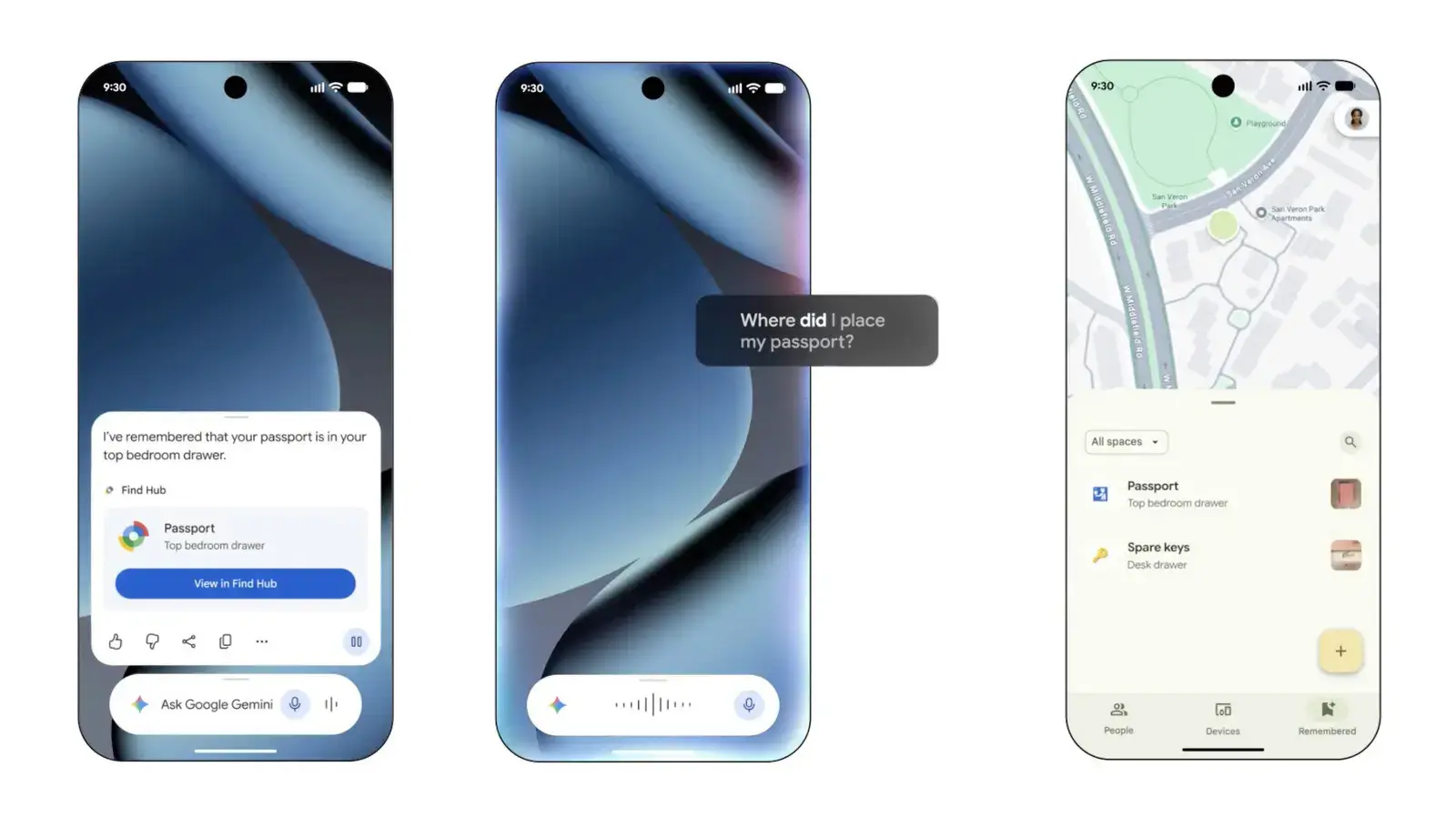
How Memory Assistance Works in the New Update
Google introduced a significant update to its Android ecosystem on September 1, 2026. The company unveiled a new feature within the Find Hub application. This tool is designed to assist users in locating misplaced personal items. The announcement occurred during a broader software release event. Google simultaneously revealed enhancements to its artificial intelligence capabilities. These updates aim to streamline daily digital interactions for millions of smartphone owners worldwide. The new tools focus heavily on memory assistance and visual communication. Users can now rely on automated tracking for their most valuable possessions. This development marks a shift toward more proactive device management. The integration of these features promises a smoother user experience across multiple platforms.
Breaking news
 Town AI Secures $108 Million Series B, Valued at $1 Billion After $55 M Pre‑Series
 Apple Prepares for Major Product Launch Event on October 28
 Apple Releases Release Candidates for watchOS, tvOS and visionOS 27.2
 Apple Limits iPhone Duo and iPhone 18 Pro Max to Reservation-Only Sales in Japan and South Korea
The primary function of the updated Find Hub is to help users recall where they placed specific objects. The system utilizes location data and user behavior patterns to create a history log. When an item goes missing, the app suggests likely locations based on previous usage. This reduces the time spent searching for keys, wallets, or other small essentials. The feature operates in the background, ensuring minimal disruption to the user’s workflow. It leverages existing sensors within compatible Android devices to gather necessary spatial data. Privacy settings allow users to control exactly which items are tracked. This granular control addresses common concerns about constant location monitoring. The interface displays a simple timeline of recent locations for each registered object. Users can mark high-value items for priority tracking. The algorithm prioritizes accuracy over speed in its calculations. This ensures that suggested locations are highly probable rather than random guesses.
Enhancing Visual AI and Messaging Integration
Beyond the Find Hub improvements, Google expanded its Gemini Live capabilities. A new visual assistant component allows for more dynamic interactions. Users can point their camera at objects while speaking to the AI. The system processes visual inputs in real-time to provide immediate answers. This functionality bridges the gap between seeing and understanding physical environments. Additionally, Google integrated its Keep note-taking app directly into the Messages platform. Users can now access saved notes without switching applications. This integration simplifies the process of sharing information during conversations. Notes appear as distinct cards within chat threads. They remain accessible even after the conversation ends. This change encourages better organization of personal data. The visual assistant and messaging updates work together to create a cohesive ecosystem. Developers have access to new APIs to build similar experiences. These tools lower the barrier for creating intuitive mobile applications.
Does the Find Hub feature work offline? Yes, the core location logging functions operate without an internet connection. Data syncs automatically once the device reconnects to a network. This ensures reliability in areas with poor signal coverage.
Frequently Asked Questions
Which apps benefit from the new Keep integration? The Messages application is the primary recipient of this update. Users can insert and view Keep notes directly within standard chat interfaces. No additional downloads are required for basic functionality.
Is the visual assistant available on all Android phones? The feature targets devices running the latest operating system version. Older models may receive support through future software updates. Compatibility depends on the specific hardware capabilities of the device.